
Most dark mode plugins stop at appearance. That worked a few years ago. In 2026, it is no longer enough.
Visitors now expect more control over how they experience a website. Some want dark mode at night. Some need bigger text. Some struggle with motion effects or low contrast layouts. Others simply want a cleaner reading experience.
That is why accessibility is becoming part of modern website experience, not just a legal checkbox. And this is exactly where the difference between Darklup and WP Dark Mode starts to matter.
Darklup just changed the game by bundling 11 accessibility modules directly into its dark mode plugin. Meanwhile, WP Dark Mode still focuses on dark mode only. If you want both features with WP Dark Mode, you’d need to buy a separate accessibility plugin like OneTap, which could cost you double.
Quick Comparison
| Feature | Darklup | WP Dark Mode |
| Dark Mode | ✅ | ✅ |
| Accessibility Panel | ✅ | ❌ |
| Accessibility Modules | ✅ | ❌ |
| Dynamic Color Mode | ✅ | ❌ |
| WooCommerce Support | ✅ | ✅ |
| Keyboard Accessibility | ✅ | ❌ |
| Multiple Plugins Required | ❌ | ✅ |
| Starts From | $29/year | $59/year |
If you only need a basic dark mode switch, both plugins can do the job. But if you want dark mode and accessibility together, the comparison changes quickly.
Why Dark Mode and Accessibility Matter Now More Than Ever

A lot of website owners still think accessibility is only for government sites or large companies. That is no longer true. Modern accessibility expectations now affect:
- WooCommerce stores
- SaaS websites
- blogs
- agencies
- membership sites
- educational websites
Dark mode isn’t a luxury feature anymore. It’s an expectation. Users expect to browse comfortably at night without hurting their eyes or draining their device battery. They also expect websites to work for them, regardless of their abilities.
Here’s the reality. About 1 in 4 adults have some type of disability. Many more have visual impairments, dyslexia, or ADHD. When a website doesn’t accommodate these visitors, you’re excluding a huge portion of your potential audience. You’re also opening yourself to legal liability.
Accessibility requirements are tightening globally. WCAG 2.1 AA is becoming standard. The Americans with Disabilities Act in the US, the European Accessibility Act in Europe, and similar laws in other countries now require websites to be accessible. That’s not optional. That’s law.
Dark mode helps too. It reduces eye strain, improves readability in low light, and makes content easier to consume. Users spend longer on sites with dark mode. They return more often. Conversion rates improve. For WooCommerce stores, dark mode makes product images look better and keeps customers engaged longer.
The problem is that most site owners have to choose. Do you want dark mode or accessibility? Most plugins only do one or the other. You end up buying multiple tools, managing multiple plugins, and paying for features you might not use.
Darklup changed that. It combines dark mode with 11 accessibility modules in one lightweight plugin. That’s the shift that matters.
Understanding the Two Competitors
Before we compare, let’s clarify what each plugin actually does.
WP Dark Mode is a popular dark mode plugin. It’s been around for years. It focuses entirely on dark mode functionality. You get multiple color presets, customization options, and scheduling features. If you want dark mode and nothing else, WP Dark Mode does that job well.
Darklup started as a dark mode plugin too. But with version 4.0.0 and beyond, it became a two in one solution. You still get all the dark mode features. But now you also get an accessibility panel with 11 separate tools. Some of these tools are free. Others unlock with the Pro version.
That’s the fundamental difference. WP Dark Mode equals dark mode only. Darklup equals dark mode plus accessibility.
What You Get with Darklup’s Accessibility Panel
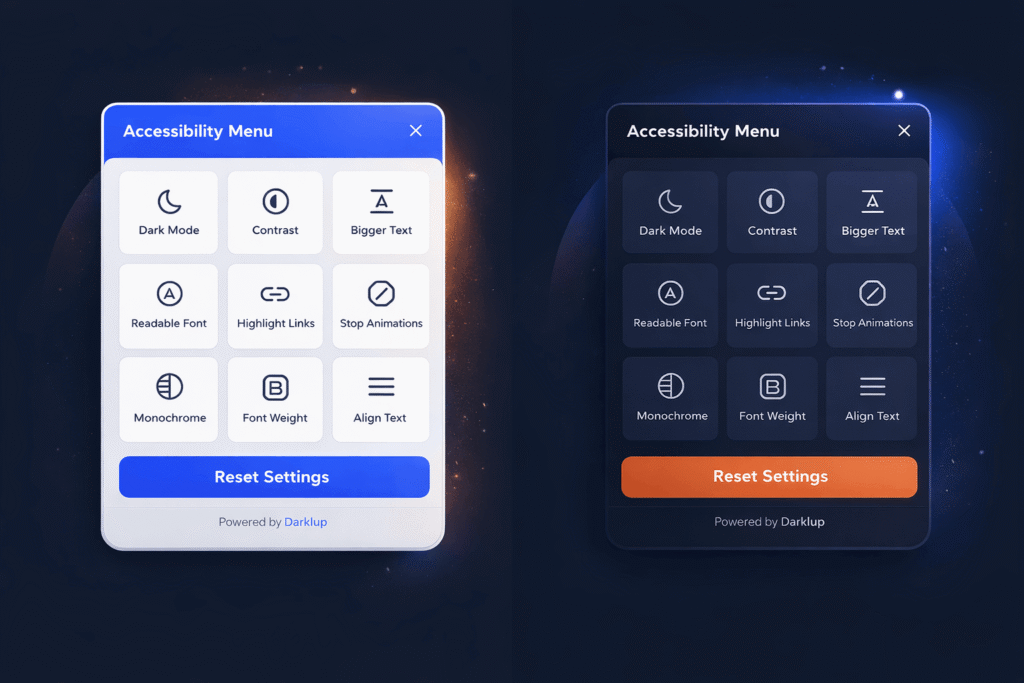
The accessibility panel is what makes Darklup different. When a visitor clicks the accessibility switch on your site, they see a full menu of tools they can enable or disable as needed.
The free version includes six modules. Bigger text lets visitors increase font size without breaking your layout. Readable font switches to a clean, easy to read typeface that helps people with dyslexia. Contrast adjusts colors into three different modes so people with low vision can read clearly. Highlight links makes all clickable elements stand out visually. Stop animations pauses moving elements on your page for people who get distracted or triggered by motion. Dark mode itself rounds out the free toolset.
The Pro version adds five more modules. Reading mask highlights one line at a time and dims everything else, perfect for people who lose their place while reading. Monochrome removes all colors and shows everything in grayscale for people overwhelmed by bright colors. Font weight makes text bolder so it’s easier to track across a line. Align text lets visitors choose left, center, or right alignment based on their preference. Hide images removes all images from view so readers can focus entirely on text content.
All 11 modules are keyboard accessible. Your visitors never need a mouse. They press Alt plus A to open the panel, then use their keyboard to navigate and toggle features. That matters for people who rely on assistive technology or simply prefer keyboard navigation.
The panel itself is fully customizable. You choose the accent color, button size, position on the page, and which modules to display. Changes happen instantly without rebuilding your site. Your visitors’ preferences get saved to their browser, so their choices stick on every visit.
WP Dark Mode What It Offers and What It Doesn’t
WP Dark Mode includes quality dark mode features. You get ten plus color schemes to choose from. You can schedule dark mode to activate at certain times. You can customize the switch button and position it anywhere on your page. Recent updates added an AI powered color preset generator where you describe the style you want and the plugin creates a custom color scheme.
The plugin supports popular page builders like Elementor, Divi, and Gutenberg. It works with WooCommerce. It remembers your visitor’s preference, so they see the same mode every time they visit. There’s also analytics tracking so you can see how many visitors use dark mode.
What’s missing is accessibility. WP Dark Mode does dark mode only. There’s no bigger text option. No readable font feature. No contrast adjustment. No reading mask or monochrome mode. If your visitors need accessibility tools, they’re out of luck. You’d have to add a separate accessibility plugin to get those features.
Dynamic Color Mode: The Algorithm That Sets Darklup Apart
Here’s where Darklup’s technology gets interesting. Most dark mode plugins use color presets. They have a template of colors that gets applied to your entire site. Simple. Fast. But also limited. What if your site design doesn’t match the preset? What if you have custom colors or brand specific styling? The preset might look okay, but it might not be perfect.
Darklup uses something different. It uses what’s called Dynamic Color Mode. This is an intelligent algorithm that analyzes your site in real time and adapts dark mode to your specific design.
Here’s how it works at a high level. When a visitor enables dark mode, the algorithm scans every visible element on your page. It looks at text, buttons, images, backgrounds, icons, cards, everything. It builds a complete map of your site’s colors.
The algorithm then evaluates each color using a luminance calculation based on WCAG standards. Luminance is how bright a color appears to the human eye, not just the technical hex code value. This matters because the same hex code can look different depending on context and surrounding colors.
Once the algorithm understands the brightness of each element, it decides what to do. Light colored elements get darkened. Dark colored elements stay the same or get gentle tweaks to maintain readability. Each element is processed individually. There’s no blanket inversion of all colors, which is what causes those broken dark mode experiences you’ve seen on other websites.
Finally, all those decisions get rendered as CSS in milliseconds. Your visitor sees a perfectly adapted dark mode version of your site instantly.
Why does this matter in practice? Let’s say you run a WooCommerce store. You have a product photo of a white t shirt. A simple dark mode that inverts all colors would make that photo nearly invisible on a dark background. Your customer couldn’t see the product. They’d leave and shop elsewhere.
Dynamic Color Mode recognizes the image, applies smart adjustments, and the product photo stays visible and beautiful. Your customer can see what they’re buying. The algorithm also handles price badges, call to action buttons, and trust signals intelligently. Everything adapts to look right in dark mode while keeping the design intact.
The same applies to blog posts. Hero images stay crisp. Gallery photos shift into clean dark tones naturally. Buttons remain clickable and visible. Text stays readable. No color inversion. No washed out images. No broken layouts. Just your design at its best in dark mode.
This is genuinely unique. Competitors either use static color presets or simple inversion algorithms. Neither approach handles the complexity of real world website designs as well as Dynamic Color Mode does. That’s why site owners who use Darklup rarely need to customize anything. The algorithm gets it right automatically.
Head to Head Feature Comparison
Let’s put both plugins side by side and see what you actually get for your money.
For dark mode features, Darklup includes Dynamic Color Mode which automatically adapts to your site design. WP Dark Mode uses preset color schemes that you select manually. Both support multiple color presets, but Darklup gives you twelve plus presets while WP Dark Mode gives you ten plus. Both support page builders. Both work with WooCommerce. Darklup wins on automatic adaptation. WP Dark Mode offers more control if you want to customize heavily.
For performance, Darklup adds just 0.06 seconds to your page load time and uses about 68.89 kilobytes of server memory. WP Dark Mode adds 0.12 seconds to page load time and uses about 396.09 kilobytes of memory. That’s a significant difference. Darklup uses about 75 percent less memory. On slow hosting or sites with many plugins, this matters. Your visitors notice faster page loads. Search engines rank faster sites better.
For accessibility, there’s no comparison. Darklup gives you six free accessibility modules and five additional Pro modules totaling eleven tools. WP Dark Mode offers zero accessibility features. If you need accessibility, you’d have to buy OneTap or another separate plugin.
For pricing, Darklup Pro costs nineteen dollars per year for one site, thirty nine dollars for ten sites, or sixty nine dollars for one hundred sites. The annual plan for WP Dark Mode costs forty nine dollars for one site or eighty nine dollars for five sites. If you want both dark mode and accessibility with WP Dark Mode, you’d need to add OneTap at ninety nine dollars or more per year. Your total cost would be one hundred forty eight dollars per year just for one site.
With Darklup Pro, you get both dark mode and eleven accessibility modules for nineteen dollars per year. That’s an eighty seven percent savings compared to buying WP Dark Mode plus a separate accessibility plugin.
Which Plugin Should You Choose?
The answer depends on what you actually need.
Choose WP Dark Mode if:
- you only care about dark mode
- accessibility is not important for your project
- you want detailed dark mode analytics
- you prefer manual color preset control
Choose Darklup if:
- you want dark mode and accessibility together
- you run WooCommerce stores
- you manage multiple client websites
- you want fewer plugins
- you want simpler setup
- you care about accessibility going forward
For most modern WordPress websites, accessibility is becoming harder to ignore.
That is why Darklup feels more future focused right now.
Final Thoughts
Both Darklup and WP Dark Mode are quality plugins. They’re both built well. They both have good customer support. The question isn’t really whether they work. The question is what you need and what represents the best value.
Choose Darklup if you want dark mode and accessibility in one plugin. Choose Darklup if you run a WooCommerce store and want product images to look perfect in dark mode automatically. Choose Darklup if you manage multiple sites because the scaling is incredibly affordable. Choose Darklup if you want zero setup required. You activate the plugin and everything just works. Choose Darklup if your visitors need accessibility features because it’s included in the Pro version.
Choose WP Dark Mode if you only want dark mode and absolutely don’t need accessibility features, which is unlikely in 2026. Choose WP Dark Mode if analytics tracking is critical to your business and you don’t mind buying a separate accessibility plugin later.
The reality is that accessibility is becoming mandatory, not optional. Laws are tightening. User expectations are rising. Site owners who ignore accessibility are making a mistake. Darklup solves this problem by bundling accessibility with dark mode. You get everything you need in one simple, lightweight, affordable plugin.
For most WordPress users, especially WooCommerce store owners, Darklup is the clear choice. You get better performance, lower cost, more features, and accessibility built in. That’s not a complicated decision.
Get Started With Darklup
If you want to test it yourself, start with the free version first.
Install Darklup Lite directly from the WordPress plugin directory and try the accessibility panel on your own website.
You will immediately understand the difference between basic dark mode and a more complete accessibility experience.
And if you need all 11 modules, Darklup Pro unlocks the full feature set starting at $29 per year.
For modern WordPress websites, that is honestly a very reasonable price for combining both dark mode and accessibility in one plugin.
